Skip to content
FlowFX

The FlowFX Platform. Engineered around the fill.

The proprietary trading environment behind every FlowFX surface — pricing, execution, positions and risk in one engine, designed for the raw book it serves.

Create portal access

Registration creates a FlowFX client portal login. Trading approval follows identity verification and eligibility review.

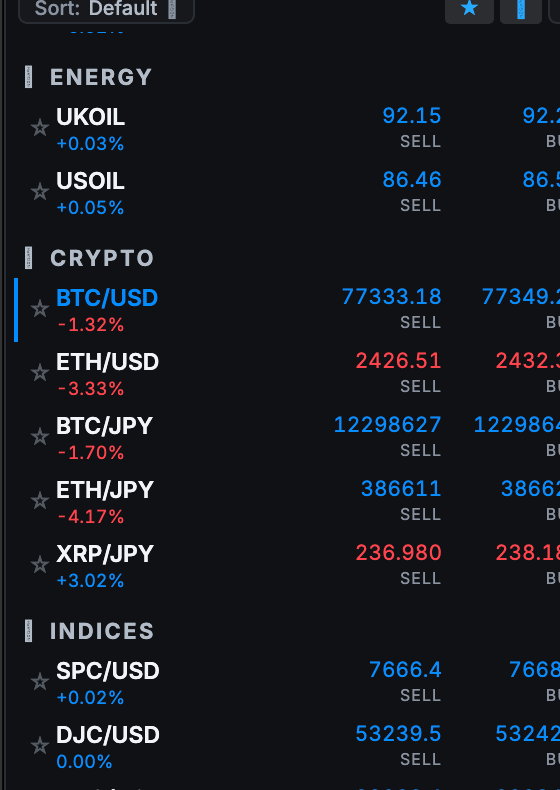
The image shows a real working environment. Platform availability and live functionality remain subject to the applicable account and service route.
The FlowFX Desktop market watch listing instruments across energy, crypto, indices and stocks with live sell and buy prices

Engineered around the fill, not decorated around it.

In-house

Designed and developed

Desktop · Web · Mobile

One engine, three surfaces

Included

With every account

01

One engine underneath everything

Prices stream from the aggregation layer into the same engine that holds positions, margins and orders. What the ticket shows is what the engine sees — no display layer approximating a different system.

  • Direct line from book to ticket
  • Margin math where the orders live
  • One history for every action
Macro of machined aluminium and dark glass seams joined by a blue light channel

Built in-house

Engineering detail is the product, not the decoration.

02

The trading surface earns its pixels

Depth-of-book at the ticket, cost preview per order, one-tap position management and alerts that describe what actually changed. The interface shows the market and the account — decoration lost the argument.

  • Depth ladder at the point of entry
  • All-in cost preview per ticket
  • Alerts with numbers, not noise

03

Risk is a first-class display

Margin level, exposure per symbol and the distance to stop-out live on the main screen — not in a submenu. The platform’s job is to keep the account’s true state impossible to miss.

  • Margin level always visible
  • Exposure grouped per symbol and family
  • Stop-out distance made explicit

Structured details

FlowFX Platform in four steps

Step
1. Register
What happens
Create the account in the client portal and verify identity
Step
2. Choose surfaces
What happens
Install desktop, open web or add mobile — any or all
Step
3. Sign in once
What happens
One credential set with device confirmation
Step
4. Trade one state
What happens
Positions, orders and alerts sync everywhere instantly

Keep exploring

The next detail should be easy to find.

Frequently asked

Start with the facts.

Answers describe the current published position. Final terms are confirmed per legal entity and shown in the client portal before an account trades.

Yes. Desktop, web and mobile are available to approved accounts, and the client portal handles registration, verification and funding.

Next step

Use the conditions in view.

Registration creates a FlowFX client portal login. Trading approval follows identity verification and eligibility review.

Create portal access